 Thinkograf
Download Thinkograf.
One app, no account, nothing to sign up for. It writes .tgraf files into your own
folders and talks to your assistant over MCP. It is not signed or notarized yet, so macOS will
ask you to allow it once — the steps are below.
- File
- Thinkograf-0.1.20.dmg
- Size
- 3.6 MB
- Requires
- macOS 14 or later
- Architecture
- Apple silicon
a8a01dff78f704e01f8abd914bcda0ac031774ecb130443778c1739ba21c7ed0 This build is not signed or notarized yet.
It carries an ad-hoc signature and no Developer ID, and Apple has not notarized it. macOS will refuse to open it until you say so explicitly — that is Gatekeeper doing its job, and it does mean you are taking our word for what is inside. A proper signature and notarization are on the list. Until then, the SHA-256 above is what you have to check against.
Four steps, once.
-
Open the disk image
Double-click
Thinkograf-0.1.20.dmgand drag Thinkograf into Applications. -
Try to open it once
Double-click Thinkograf. macOS will refuse, and say the app cannot be verified. That refusal is what puts Thinkograf into the list in the next step, so it has to happen first.
-
Allow it in Privacy & Security
Open System Settings › Privacy & Security, scroll to the bottom, and click Open Anyway beside the message about Thinkograf. Confirm, and it launches. On macOS 14 the older right-click › Open shortcut still works; on macOS 15 and later it does not, so this is the route that always does.
-
Connect your assistant
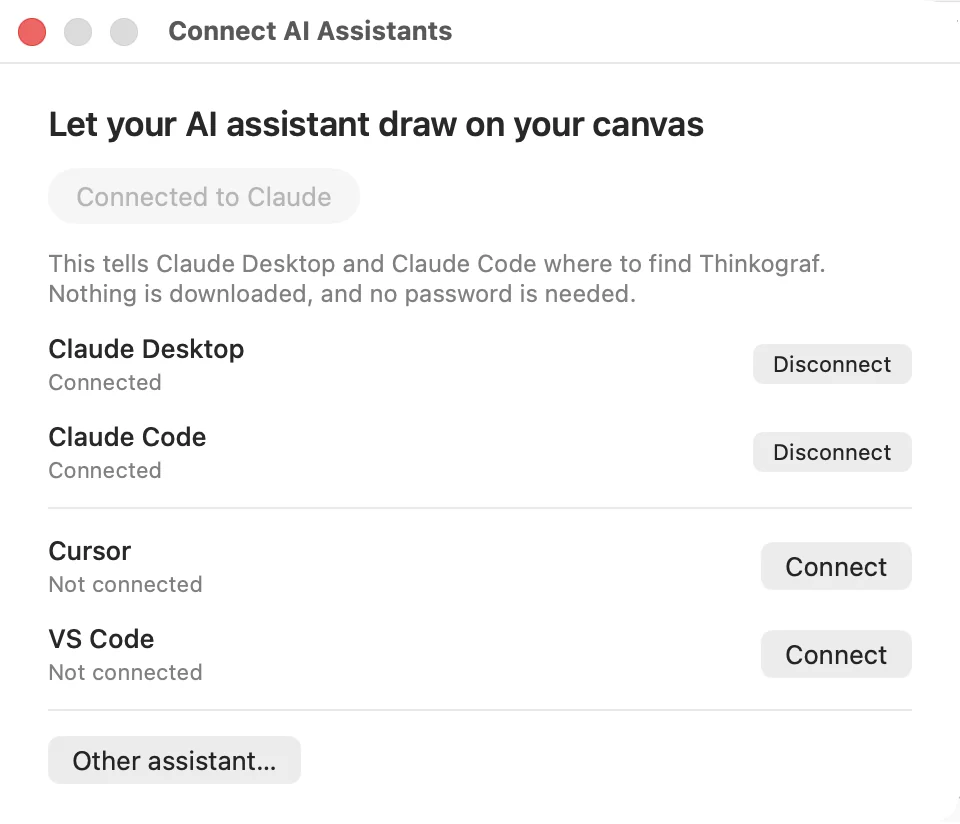
In the start window, choose Connect and pick Claude Desktop, Claude Code, Cursor or VS Code. Thinkograf writes the MCP entry into that client’s own config. Restart the client and the dot on the canvas turns green.
Any MCP client, not one product.
Thinkograf speaks MCP, so it works with whatever you already have open. Pick a client and it writes the server entry into that client’s own config — no JSON to paste, no path to find.
An alpha, plainly.
What works
Everything on the features page. The canvas, versions, split view, comments, icons, categories, PNG export, and the whole MCP tool surface.
What to expect
Rough edges, and file format changes between versions. Keep anything you care about in
git, which is where .tgraf files are meant to live anyway.
What it does not do
No account, no sync, no telemetry, and no network calls of its own. It is an app that reads and writes files on your Mac.
Intel Macs
Not yet — this build is Apple silicon only. If you need an Intel build, that is worth knowing.
Ready when you are.
3.6 MB. It will be open in under a minute.